
会话即树,不是日志
每条消息都带着父节点,历史是一棵可以走的树——从任意节点分叉、回退、重新回答。上下文占用实时可见,长会话也不会迷失方向。
- 画布地图画出完整的会话 DAG
- 轨迹面板把同一棵树投影成时间线或分支视图
免费测试版 v0.6.0 macOS · Windows · Linux · Android · 终端
MusePi 是一位真正能动手的 AI 搭档:写代码、跑命令、查资料、开浏览器,样样上手。桌面应用、命令行、手机随时切换,会话与设置一路跟着你;模型、工具、界面都是可换的零件,按你的工作流重新组装——而不只是浏览器里又一个标签页。
$ curl -fsSL https://raw.githubusercontent.com/MuseLinn/MusePi/main/scripts/install.sh | sh
> irm https://raw.githubusercontent.com/MuseLinn/MusePi/main/scripts/install.ps1 | iex
这一条命令装的是终端版(后台服务随之启动);想直接用图形界面,就从上面的平台菜单里挑安装包。装好后桌面版、终端 TUI 与移动伴侣共用同一批会话。
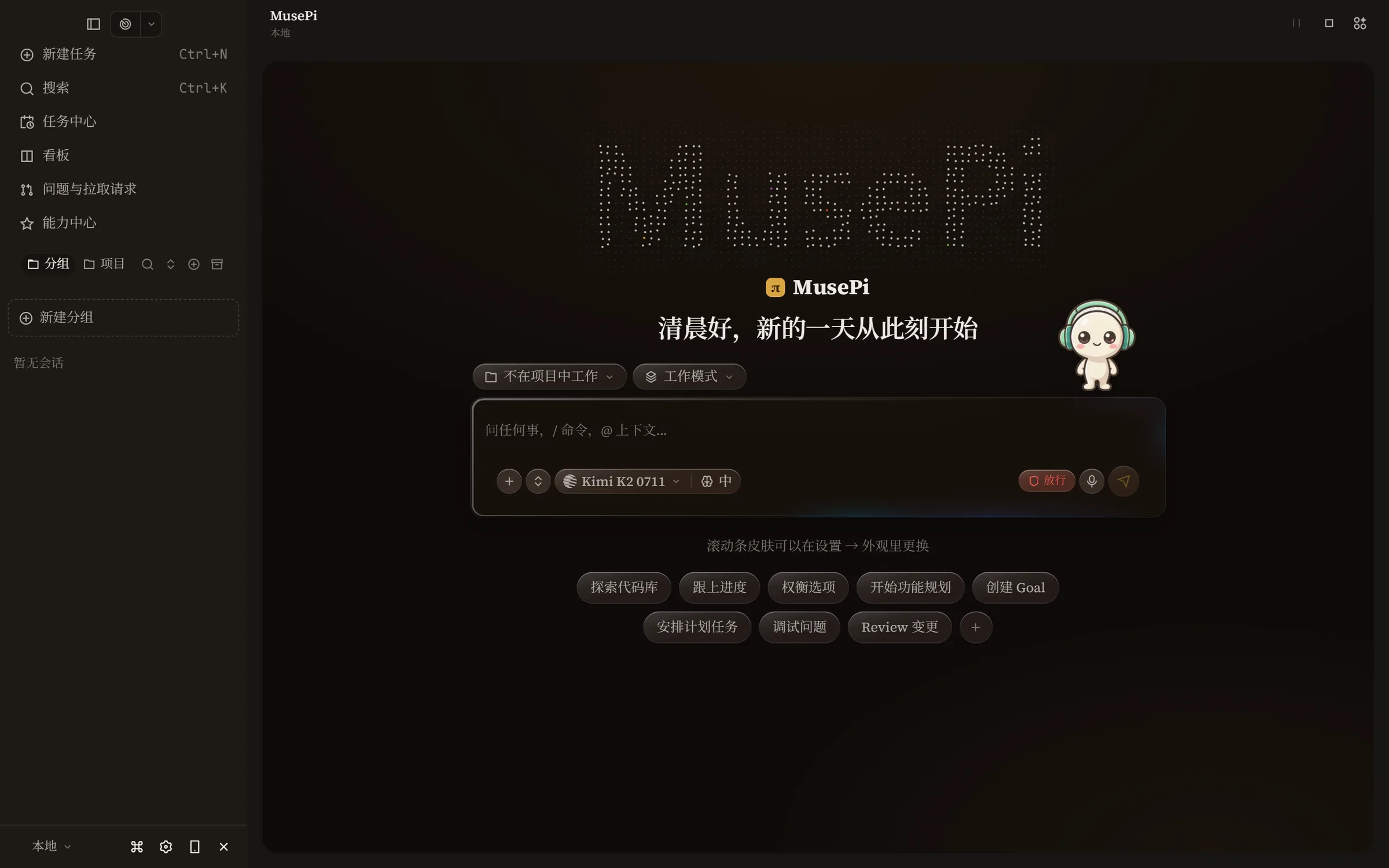
产品界面预览
欢迎工作台实景:左侧是会话与任务入口,中间是随时待命的输入框,模型、工具与界面皆可替换。这不是示意图——随每个版本由真实界面自动截图生成。
为什么选 MusePi
每条消息都带着父节点,历史是一棵可以走的树——从任意节点分叉、回退、重新回答。上下文占用实时可见,长会话也不会迷失方向。
桌面应用、命令行和手机背后是同一个大脑:同一批会话、同一套设置、同一批正在运行的任务。这边发起的运行,那边接着推送;换了界面,不换了上下文。
一切皆可插拔:模型提供商、工具、界面表面。它在后台盯着你的扩展目录,热重载随时生效——加能力不用重启,也不用等发版。
迭代进行时
桌面 GUI、共享后台、常驻桌宠、移动伴侣、扩展系统与协作面都是我们自己做的,独立发版、独立定版本线。下面这些不是路线图上的承诺,是最近几个版本里已经发出去的东西。
给页面画标注,和智能体说「就这里」:内置浏览器和对话里的界面共用同一套标注工具——选元素、框区域、随手画,圈注连同注释自动附进输入框,智能体看到的就是你圈出的画面。
窗口顶栏可以开多会话标签页了(设置→外观→聊天):固定宽度、悬停出菜单和关闭钮、还没发过消息的草稿显示斜体——像浏览器标签一样管理并行的会话。
侧栏新增「问题与拉取请求」入口,打开就是一整页中心:当前分支的 PR、仓库里所有打开的问题,详情里能直接合并、关闭、重开、加标签——不必跳回浏览器。
价格
MusePi 正处于打磨功能的免费测试阶段,全部核心能力都开放使用、不限用量。社区版会一直免费;专业版与团队版是更远期、要等现有功能打磨成熟之后才考虑的事。下面的月付 / 年付切换已经就位,等付费档位真正开放即可一键查看——现在三档都指向免费的社区版。
当前 · 永久免费
¥0/ 永久
完整的 MusePi,不加锁、不限量。
远期规划
待定
为重度使用者准备的进阶能力,功能打磨成熟后再谈。
远期规划
待定
给一起写代码的小队,同样在更远期的设想里。
常见问题
现在是打磨功能阶段的免费测试,全部核心能力都开放使用,不限会话数、也不限消息数。社区版会永久免费;专业版、团队版是更远期、要等现有能力打磨成熟之后才会考虑的事——MusePi 不会悄悄把已经免费的功能变成收费墙。
桌面版覆盖 macOS(Apple Silicon)、Windows 10/11(x64 与 ARM64)、Linux(.AppImage 与 .deb,x64 与 ARM64);终端 TUI 三平台加 WSL 通用;移动伴侣提供 Android arm64 的 .apk。它们连的是同一个后台服务,会话与设置完全一致。
是的。MusePi 支持 60+ 模型提供商,你在设置里填入自己的密钥即可使用,模型费用直接向你选定的供应商结算,MusePi 不做中转、不抽成。你也可以接本地模型。
MusePi 在你自己的机器上运行,会话、设置与历史都存在本地,默认不上传。移动伴侣通过局域网扫码配对、远程控制全程端到端加密,不经过任何第三方服务器。唯一的对外网络请求,是你自己配置的那家模型提供商。
MusePi 是一个 AI 工作台:桌面 GUI、终端、移动伴侣、常驻桌宠共享同一个后台,模型、工具、界面皆可替换。桌面与移动端、扩展系统与协作面都是我们自己做的,整体以 MIT 许可开源。
一行命令装好终端 TUI(后台服务随之启动):curl -fsSL https://raw.githubusercontent.com/MuseLinn/MusePi/main/scripts/install.sh | sh(macOS / Linux / WSL),Windows 用 irm https://raw.githubusercontent.com/MuseLinn/MusePi/main/scripts/install.ps1 | iex。需要 Node ≥ 22 或 Bun。想直接上手图形界面,就在首屏的平台菜单里选你的系统,或去 Releases 看全部安装包。